🎉 All-in-One Billing, Inventory & Accounting Platform for Faster Business Growth BUY NOWs 👉

Download a Professional Ledger Format

Organize your business accounts, track debits and credits accurately, and maintain flawless financial health with Raseed's free ledger formats. Eliminate manual calculation errors, track real-time balances, and keep your accounting systematic, professional, and audit ready.

Get Professional Ledger Formats for Your Business

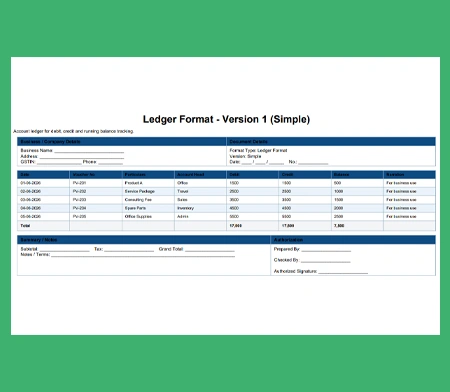
Ledger Format-1

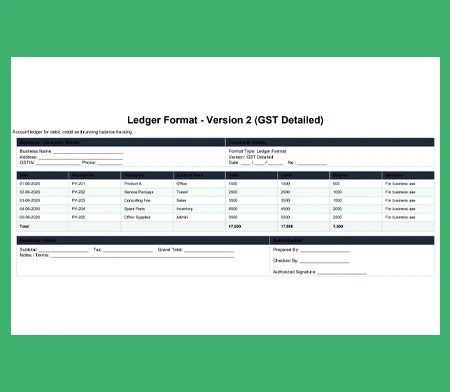
Ledger Format-2

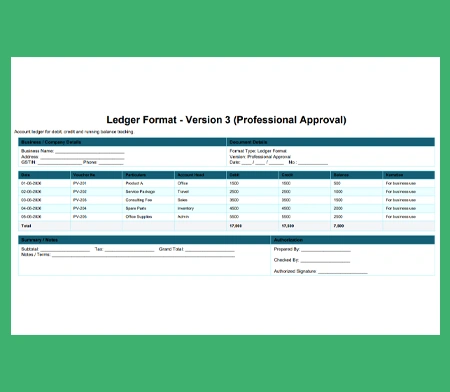
Ledger Format-3


What is a Ledger Format?

A general ledger format is a structured document used to record and organize a business's financial transactions.

It categorizes entries into individual accounts, providing a clear financial overview, and serving as the foundation for accurate accounting and financial reporting.

Features of Raseed Ledger Account Format

Effortless Account Tracking

Quickly view incoming and outgoing transactions. The clean structure of a general ledger format simplifies financial tracking, ensuring your accounting process is both swift and accurate.

Customizable Structure

Customize the ledger template to match your unique industry requirements, allowing you to seamlessly categorize assets, liabilities, equity, revenues, and expenses.

Export and Share Seamlessly

Instantly export finalized financial ledgers into PDF or Excel formats. Share them directly with your accountant, team, or stakeholders via email or WhatsApp straight from Raseed.

Multi-Branch Consolidation

Manage books for multiple retail outlets or office locations seamlessly. You can maintain independent ledger records for each branch or merge them into a single, unified master ledger instantly.

Trial Balance Generation

Bridge the gap between data and final sheets. Raseed instantly pulls the closing entries from your general ledger format to construct error-free Trial Balances and Profit & Loss reports.

Automated Reconciliation

Match your ledger template entries directly against your bank statements or payment gateway logs to detect missing entries or banking errors automatically.

Filter and Search Capabilities

Search into your transaction history instantly by filtering your ledger account format by date range, voucher type, specific payment modes, or transaction amounts.

User-Access Permissions

Assign role-based access permissions so your staff can input daily ledger entries without gaining view access to company-wide capital, payroll, or cash accounts.


Follow These Steps to Create a Ledger Format

Step 1

Download the free ledger template and enter your company name along with the specific account title.

Step 2

Write down the date of the transaction and provide a clear, concise description in the respective column.

Step 3

Input the Journal number for cross-referencing and place the financial figure in either the Debit or Credit column.

Step 4

Calculate and update the running balance to maintain a real-time summary of the account.

Step 5

Review all entries for accurate double-entry balancing before exporting the sheet for your monthly financial closing.

Core Highlights of a General Ledger Format

A well-structured general ledger acts as the central hub of your business's financial data. The ledger account format connects every individual ledger record back to the initial source invoice, voucher, or journal entry.

Double-Entry Reconciliation
T-Account Visual Separation
Audit Trail Visibility
Organizes Entries by Date
Categorized Financial Isolation
Historic Data Retrievability
Streamlined Trial Balance
Accounting Compliance

Different Types of Ledger Account Formats

Depending on your business structure and reporting types, different ledger setups can be utilized to organize data effectively. It ensures every debit entry corresponds to a matching credit entry, keeping your accounting equations perfectly balanced.

Standard T-Ledger Format: The classic accounting layout split vertically down the middle. Debits sit on the left, and credits sit on the right. Perfect for simple manual tracking and classroom visualization.

Subsidiary Ledger Template: A specialized sub-ledger used to track detailed individual accounts under a massive category such as an accounts receivable ledger tracking individual customer outstanding balances.

General Ledger Summary: A high-level format that groups all individual ledger balances together into one overarching master document, used directly to construct your Trial Balance and Profit & Loss statements.

Investment Portfolio Ledger: A financial tracking ledger designed to monitor capital outlays in external shares, bonds, mutual funds, and their respective dividend payouts.

Accounts Payable Ledger Format: A vendor-focused sub-ledger used to maintain records of your suppliers, tracking credit purchases, historical payments, and upcoming liabilities.

FAQs

It serves as the master record of your business accounts. By transferring day-to-day entries into a structured general ledger format, you group chaotic journal entries into organized categories to easily find total expenses, revenues, or asset values.
Instead of manually looking through multiple loose invoices to see how much an individual client owes you, a dedicated ledger account format centralizes every single transaction for that specific client onto one scannable page for quick reference.
Yes, absolutely. Once you fill out your financial data using our interactive ledger template, you can export the sheet into clean PDF or Excel sheets, allowing you to instantly share audit-ready books with your tax professional or accounting team.
Yes. While standard accounting conventions require date, particulars, and amount columns, you can easily customize Raseed's templates to incorporate custom fields like GST numbers, payment modes, or department codes.
A journal is the book of prime entry where daily transactions are typed chronologically as they happen. A general ledger format is the secondary book where those journal transactions are categorized into individual accounts to calculate final balances.
Raseed paths