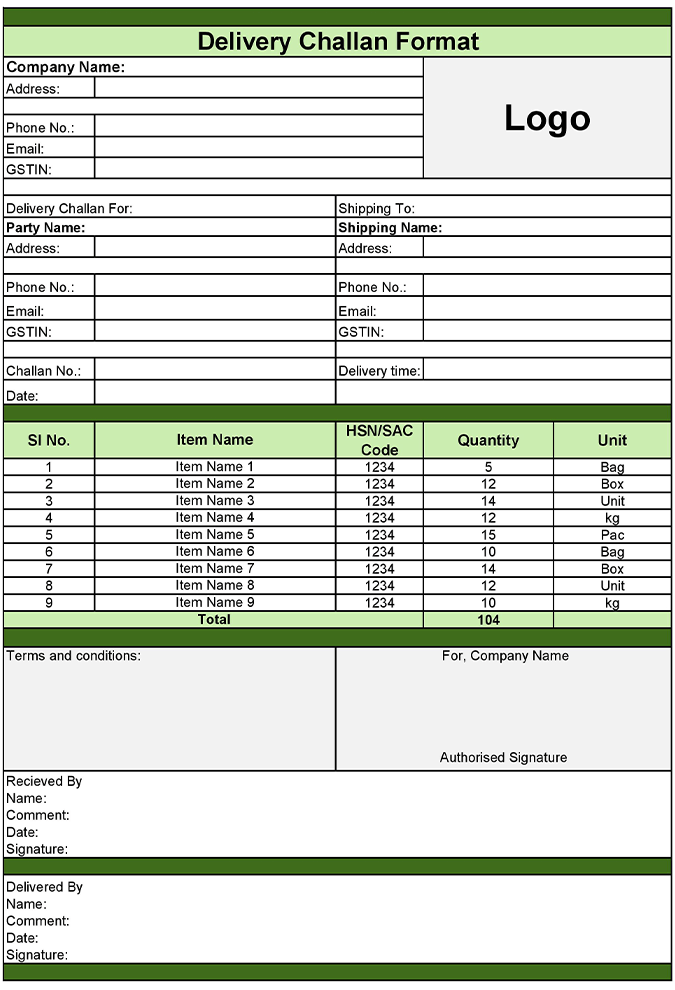
Move the goods/products with confidence using a delivery challan format that keeps records organized. Raseed offers editable templates that help businesses document goods transfer properly, whether for job work, branch movement, or approval-based delivery.
A delivery challan format helps businesses track the movement of goods when an invoice is not issued immediately. It creates a clear trail for transportation, internal transfers, and third-party processing. Raseed simplifies the entire process by offering ready-to-use templates that are easy to edit, share, and store.
Features for Clear Delivery Documentation
Multiple File Options
Use delivery challan format in Word for quick edits, Excel for structured tracking, or PDF for finalized sharing.
Clear Goods Documentation
Record item details, quantities, and purpose of movement without confusion.
Professional Layout
Present clean and organized challans that reflect business credibility.
Easy Record Maintenance
Keep all delivery challans accessible for reference and audits.
Editable & Reusable
Customize once and reuse the same delivery challan format for future dispatches.
How to Use a Delivery Challan Format
Step 1
Select a Template: Choose a delivery challan format in Word, Excel, or PDF based on your requirements.
Step 2
Fill in Details: Add supplier information, receiver details, and the description of the goods.
Step 3
Mention Movement Purpose: Clearly specify why the goods are being transported, is it internal or for third parties?
Step 4
Review Before Dispatch: Check challan number, date, and item quantities to make sure everything is in place.
Step 5
Share with Shipment: Attach the delivery challan format in PDF, Word, or Excel along with the goods/products that are transported.
Where Delivery Challan Formats Are Used?
Delivery challan formats support multiple business scenarios across industries.
Goods sent for job work
Branch or warehouse transfer
Materials sent on approval basis
Returnable goods movement
Raw material dispatch and receipts
Types of Delivery Challans
Material Delivery Challan: Used to track raw materials sent to job workers or received from suppliers. Also cover finished goods that are sent back after processing.
Job Work Delivery Challan: Issued when goods are sent to a third party for processing or manufacturing under contract.
Transport Delivery Challan: Used in situations when goods are moved, but a sale invoice cannot be issued immediately under GST rules.
Approval/ Returnable Delivery Challan: Applied when goods are sent to customers for approval, display, or return. Tracks the temporary movement until the goods are returned or approved for sale.
Frequently Asked Questions!
Common Customer Questions That Will Help You
Raseed billing software is a secure financial management gateway that allows users to manage their transactions efficiently, offering features like real-time analytics and enhanced security.
Does a delivery challan require GST details?
Yes, it should include GSTIN, HSN code, item details, and supplier/receiver information if applicable.
Can delivery challans be used for multiple shipments?
Yes, a separate delivery challan should be issued for each partial shipment against a single invoice.
Is using a delivery challan format mandatory?
For certain movements like job work, branch transfers, or approval-based goods, GST rules require issuing a delivery challan.
What is delivery challan format?
A delivery challan format is a document used to record goods movement without issuing a tax invoice immediately.
Can I customize the cash flow statement format in Excel?
Yes, Raseed allows you to export your data into Excel, where you can further customize columns or styling to meet specific stakeholder requirements.